


P-Series PBX
Yeastar P570 VoIP PBX Phone System
Yeastar P570 VoIP PBX Phone System Overview Front panel Yeastar P570 VoIP PBX Phone System supports 2 expansion boards. You can install EX08 board or EX30 board according to your needs. No. Interface or Expansion…
KSh 180,000.00Listed product price · confirm current availability with Starmount.
Request a quote for this product Discuss it on WhatsApp
Equipment supplyInstallation enquiriesDirect team contact
Know what you’re choosing
Product information
Yeastar P570 VoIP PBX Phone System Overview
Front panel
Yeastar P570 VoIP PBX Phone System supports 2 expansion boards. You can install EX08 board or EX30 board according to your needs.

| No. | Interface or Expansion Board | Description | ||
|---|---|---|---|---|
| ① | NFC tag | Tap NFC-capable mobile phone's back against Yeastar logo to quickly configure network settings. | ||
| ② | EX30 Expansion Board | Used to connect an E1/T1/J1 line. | ||
| ③ | EX08 Expansion Board |
Up to 4 modules and 8 RJ11 ports are supported on the expansion board. The 8 RJ11 ports can be used to connect to different objects:
|
||
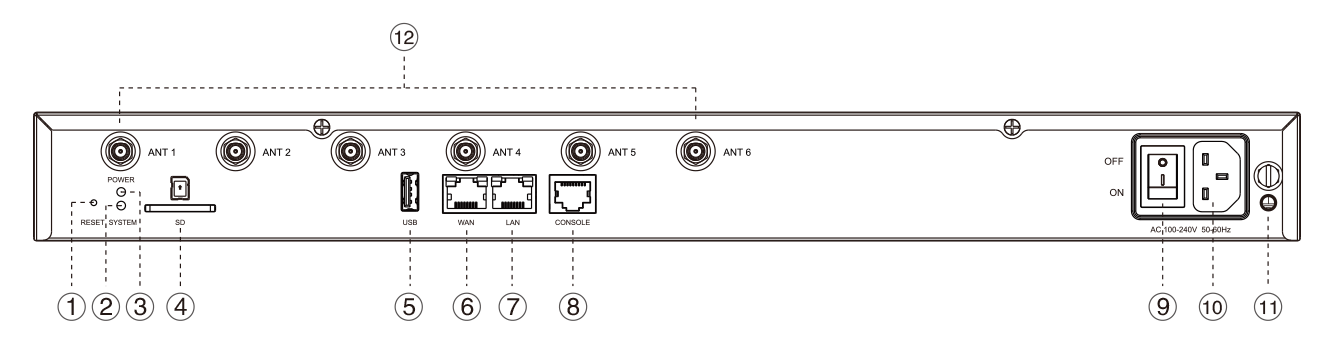
Rear panel
| No. | Indicator, Button, or Interface | Description |
|---|---|---|
| ① | Reset button | Press the button and hold for 10 seconds to restore to factory defaults. |
| ② | System Indicator | Indicate the system status.
|
| ③ | Power Indicator | Indicate the power status. |
| ④ | SD Slot | Insert an SD card to store recording files, voicemails, or logs. |
| ⑤ | USB Slot | Insert a USB flash drive to storage recording files, voicemails, or logs. |
| ⑥ | WAN Port |
For connection to Wide Area Network (WAN). |
| ⑦ | LAN Port | For connection to Local Area Network (LAN). |
| ⑧ | Console | Connect RS232 line to debug the system. |
| ⑨ | Power Switch | Press this button to switch on/off the device. |
| ⑩ | Power Inlet | Connect the supplied power supply to the port. |
| ⑪ | Protective Earth | Connect to the ground to reduce the risk of electrocution to the user or protect the PBX from bad effects of external noise in case of a lightning strike. |
| ⑫ | Antenna Socket | Rotate the antenna into the Antenna Socket. |
More options
All p-series pbx Related products.


Yeastar NeoGate TA2400
TA FXS/ FXO GATEWAYS
Original price was: KSh 71,500.00.KSh 65,000.00Current price is: KSh 65,000.00.
Add to cart
The next step is a conversationA single product.
A single product.
Or your next big project.
Tell us what you need. Let’s find the right equipment and approach.