
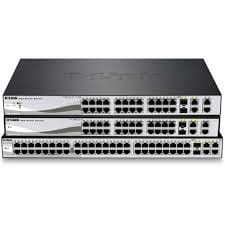

D-link DES-1024D 24‑Port Fast Ethernet Rack-Mount/Desktop Switch
D-Link switches
Original price was: KSh 6,500.00.KSh 5,500.00Current price is: KSh 5,500.00.
Add to cart
DLINK DES1210-52/E 52-Port Fast Ethernet Smart Managed Switch
D-Link DES-1210-52/E – A 52-port Fast Ethernet smart managed switch designed for businesses and enterprise networks. Delivers reliable, high-performance connectivity with advanced management features to optimize network traffic and efficiency.


Advantages & Benefits:
52 Fast Ethernet Ports – Connect a large number of devices with stable 10/100Mbps speeds.
Smart Management Features – VLAN, QoS, IGMP snooping, and port trunking for optimized network performance.
Reliable & Stable Connectivity – Ensures smooth data transfer across all connected devices.
Rack-Mountable Design – Fits neatly in standard racks for professional setups.
Energy Efficient – Reduces power consumption while maintaining performance.
Easy Web-Based Management – Intuitive interface for configuration and monitoring.
LED Indicators – Quickly monitor port activity and link status.
Durable & Long-Lasting – Designed for continuous operation in demanding office or enterprise environments.
Supports Network Expansion – Ideal for growing businesses or large offices.


Quick Setup Guide:
Rack Installation – Secure the switch in a standard network rack.
Connect Devices – Plug Ethernet cables from computers, printers, IP cameras, or other devices into the ports.
Power On – Connect the power cable and switch on the device.
Access Web Interface – Configure VLANs, QoS, port trunking, and other settings if needed.
Monitor Network – Use LED indicators and management interface to track performance and activity.
Enjoy Reliable Connectivity – All connected devices now have stable network access.
D-Link switches

D-Link switches

D-Link switches

Tell us what you need. Let’s find the right equipment and approach.