
Telephony & VOIP
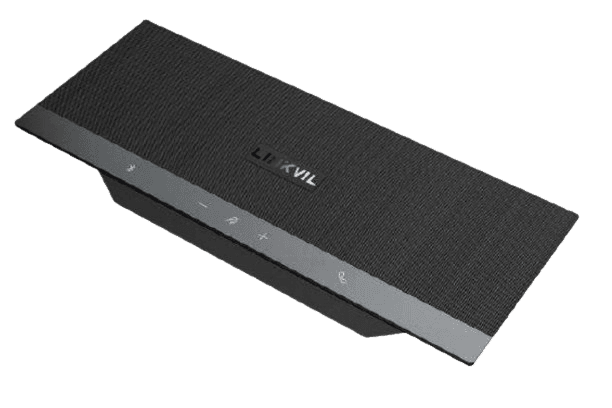
Fanvil CS40 Conferencing Speakerphone
Fanvil CS40 The Fanvil CS40 conferencing speakerphone offers several key features that make it a versatile tool for meetings and calls. Here are some of its notable features: High-Quality Audio: The CS40 is designed…
KSh 8,500.00Listed product price · confirm current availability with Starmount.
Request a quote for this product Discuss it on WhatsApp
Equipment supplyInstallation enquiriesDirect team contact
Know what you’re choosing
Product information
Fanvil CS40
The Fanvil CS40 conferencing speakerphone offers several key features that make it a versatile tool for meetings and calls. Here are some of its notable features:
- High-Quality Audio: The CS40 is designed to deliver clear and high-fidelity sound, making it suitable for both voice calls and music playback.
- 360-Degree Microphone: Equipped with multiple microphones, it captures voices from all directions, allowing participants to be heard clearly from anywhere in a small to medium-sized room.
- Bluetooth Connectivity: The device supports Bluetooth 5.0, enabling wireless connections to smartphones, tablets, and other Bluetooth-enabled devices.
- USB Connection: It offers USB connection options, making it compatible with computers and various conferencing applications.
- Portable Design: The compact and lightweight design makes it easy to transport, allowing users to set it up in different locations as needed.
- Long Battery Life: The CS40 features a rechargeable battery that provides extended use, making it suitable for longer meetings.
- Easy Operation: It typically includes intuitive buttons for call control, volume adjustment, and other functions, enhancing user experience.
- LED Indicators: The device features LED indicators to show power status, connection status, and mute functionality.
- Compatibility: It works with various VoIP platforms and softphones, ensuring it can be integrated into different conferencing environments.
These features make the Fanvil CS40 a practical choice for businesses looking to enhance their communication experience, especially in hybrid and remote work settings.
Connecting the Fanvil CS40 to your device is a straightforward process. Here are the steps for both Bluetooth and USB connections:
Fanvil CS40 Connecting via Bluetooth:
- Power On the Device: Press the power button on the Fanvil CS40 to turn it on. The LED indicator should light up.
- Enter Pairing Mode: If it’s the first time you are connecting, the CS40 should automatically enter pairing mode. If not, press and hold the Bluetooth button until you see the Bluetooth LED indicator flashing.
- Enable Bluetooth on Your Device: On your smartphone, tablet, or computer, go to the Bluetooth settings and enable Bluetooth.
- Search for Devices: Look for available devices and search for "Fanvil CS40" in the list.
- Select the Device: Tap or click on "Fanvil CS40" to pair. You may hear a confirmation tone, and the LED indicator will stop flashing to indicate that it is connected.
Connecting via USB:
- Power On the Device: Ensure that the CS40 is powered on.
- Connect the USB Cable: Use a USB cable to connect the CS40 to your computer or laptop's USB port.
- Automatic Recognition: Your computer should automatically recognize the device. You may need to select the CS40 as your audio device in your computer's sound settings.
- Configure Settings: Adjust the audio settings in your video conferencing or calling application to ensure the CS40 is selected as the input and output device.
Tips:
- Ensure that your Fanvil CS40 is fully charged if using it wirelessly.
- If you encounter connection issues, try restarting the CS40 and your device and ensure they are within the recommended distance (up to 10 meters).
- For USB connections, make sure to use a compatible USB cable.
By following these steps, you should be able to connect your Fanvil CS40 easily and enjoy enhanced audio quality in your calls and meetings.
More options
All telephony & voip Related products.


The next step is a conversationA single product.
A single product.
Or your next big project.
Tell us what you need. Let’s find the right equipment and approach.