Features & Specifications:
Monitor door phone camera footage on both mobile and indoor station
Flexible door access methods
Supports one-touch calling
Remote door opening anywhere, anytime
Quick deployment
CCTV integration
Full-duplex high-definition audio
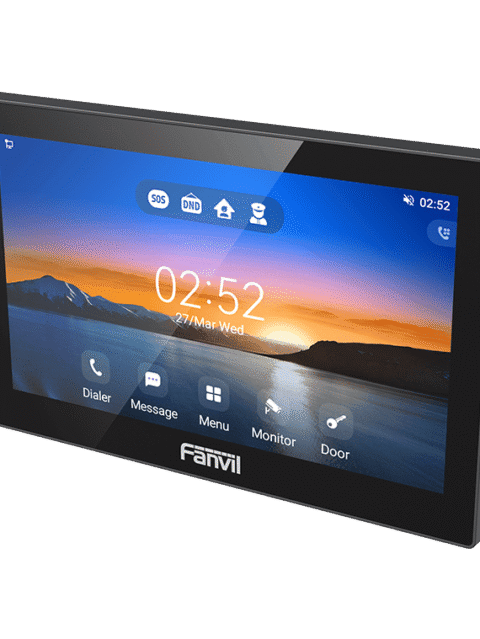
7-inch color touchscreen
Wall-mounted
Rain cover
KSh 17,400.00 Including VAT (Before VAT: KSh 15,000.00) + VATListed product price · confirm current availability with Starmount.
Equipment supplyInstallation enquiriesDirect team contact
Know what you’re choosing
Product information
Fanvil VIK-01; Introduction,
Fanvil VIK-01; The Fanvil VIK-01 is a smart video intercom kit for homes/villas, combining an i60 Video Door Phone, an i504W Indoor Station (7" touchscreen), and the Fanvil Link App for secure, convenient access control via HD video calls, remote door unlocking (app/indoor unit), RFID/password, dual-band Wi-Fi, and also the Fanvil VIK-01 comes with an easy plug-and-play setup, integrating with IP cameras for enhanced security.
Key Features & Components for Fanvil VIK-01:
Integrated System: Includes the Fanvil i60 (Outdoor Door Phone), i504W (Indoor Station), and Fanvil Link App.
HD Video & Audio: High-definition video (up to 1080p) and full-duplex audio with echo cancellation for clear communication.
Remote Access & Control: Unlock doors remotely via the app or indoor unit; monitor the door phone camera from anywhere.
Multiple Access Methods: Supports RFID, password, DTMF, and the mobile app for flexible entry.
Smart Connectivity: Features dual-band Wi-Fi (2.4G/5G) for stable wireless connection.
Easy Deployment: Plug-and-play setup requiring only power and network connections.
CCTV Integration: Pairs with IP cameras for a comprehensive surveillance system.
User-Friendly App: Fanvil Link App for remote management and monitoring (includes 1 license for 5 app users).
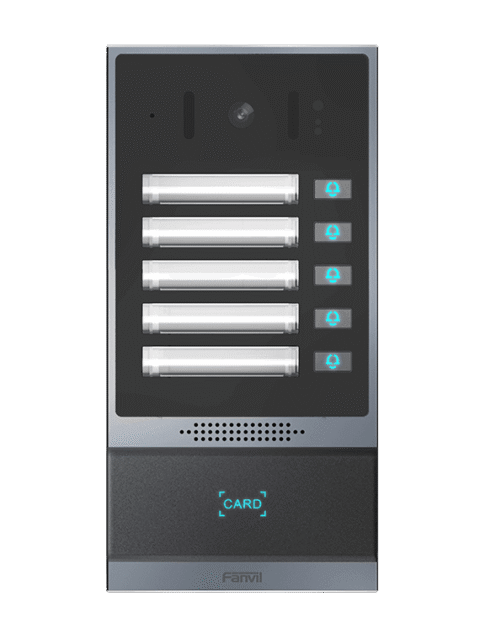
Durable Outdoor Unit (i60): IP65 weatherproof rating, 2MP HD camera, IR night vision, and a speed-dial button.
Advanced Indoor Station (i504W): 4-inch color touchscreen, wall-mounted.
Benefits:
Enhanced Security: Real-time video, remote door control, and camera integration reduce risks.
Convenience: Manage visitors and access from your phone or indoor unit, anywhere.
Versatility: Ideal for villas and single-family homes, expanding to a full security ecosystem.
Installation guide for fanvil vik-01
1. Physical Installation & Wiring
Mounting: Install the outdoor door station (i60) near the door and the indoor station (i504W) inside the home. Use the included brackets and rain cover for the outdoor unit.
Power & Network: Connect the units. The VIK-01 supports PoE (Power over Ethernet), simplifying setup by providing power and data over one cable. Ensure a stable internet connection for both units.
This video demonstrates the physical mounting and wiring for the Fanvil video intercom:
2. Initial Indoor Station Setup (i504W)
Power On: The indoor station will boot up.
Wizard: Follow the on-screen wizard.
Language & Time: Select your language and time zone.
Network: Configure the network (Wi-Fi or LAN), connecting it to your home network.
Discovery: The indoor station will discover the outdoor door phone (i60).
Name Device: Give the door phone a name (e.g., "Front Door").
Watch this video to see how to set up the network and Wi-Fi on the Fanvil indoor station: